Tamadu
EN ▾
Open app

Keep track of nutrition and training – no account, no ads

Tamadu counts calories and nutrients, plans your training and shows which muscles are being neglected. Free, in 24 languages, and your data stays on your device.

Tamadu’s promise

✓
Free
All features, no subscription and no paid tiers.
✓
No account
Just open it and get started – no sign-up, no email.
✓
No ads
No banners, no tracking, no analytics services.
✓
Data only on your device
What you log stays with you. Back it up or move it via export.
✓
Works offline
Logging and reviewing work without a connection; barcode lookup and AI need the internet.
✓
24 languages
All official EU languages, with the exercise names commonly used there.

What you get

Nutrition

  • Calories and nutrients, including vitamins and minerals
  • Barcode scanning and a built-in food database
  • Log meals by photo, text or voice (AI with your own free key)
  • Drinks and remembered foods

Training

  • Plans with levels for bodyweight, dumbbells and the gym
  • Exercises with pictures and instructions
  • Your own exercises and variants
  • Muscle balance: what has been neglected lately

Weekly challenge

  • Every Monday a goal for the area that was neglected
  • With the matching exercises

Points and achievements

  • Points, levels and achievements for sticking with it
  • Accessories for your Tama when you reach new levels

Recipes

  • Recipes with nutrition values
  • Your own recipes and a shopping list

Exercises with instructions

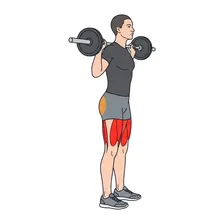
Squat (Barbell)
Squat
Barbell · Strength
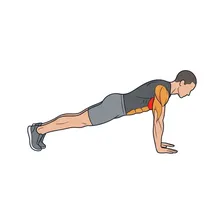
Push-up
Push-up
No equipment · Strength
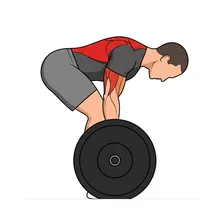
Pendlay row (Barbell)
Pendlay row
Barbell · Strength
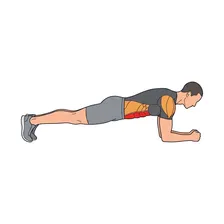
Plank
Plank
No equipment · Isometric hold

View all exercises ›

How to get started

1
Open tamadu.app in your browser – on your phone or computer.

2
Install the app on your home screen (instructions below).
3
Get started: fill in your profile, log your first meal or workout. You don’t need an account.

Install

iPhone and iPad

  1. Open tamadu.app in Safari.
  2. Tap “Share” – in the compact tab layout, tap “Page Menu” (•••) first.
  3. Choose “Add to Home Screen”, turn on “Open as Web App” and tap “Add”.

Android

  1. Open tamadu.app in Chrome.
  2. Open the menu (⋮) and choose “Install and create shortcut”.
  3. Tap “Install”.

PC and Mac

  1. Open tamadu.app in Chrome or Edge.
  2. Click the “Install” icon in the address bar.
  3. Confirm with “Install”.

Tama, your companion

Tama, the Tamadu mascot

Tama keeps you company in the app. When logging and training take you to new levels, Tama gets new accessories – a friendly nudge to keep going, without pressure.

Why Tamadu

TamaduMany other apps
Account requiredNousually yes
Subscription for all featuresNooften
AdsNonecommon
Tracking and analyticsNonecommon
Where your data is storedOn your deviceusually with the provider

Frequently asked questions

How much does Tamadu cost?

Nothing. All features are free, with no subscription and no ads.

Do I need an account?

No. You open the app and get started, without signing up and without an email address.

Where is my data stored?

Only on your device. With the export you can back it up or take it to another device.

Does Tamadu work without internet?

Yes, logging and reviewing work offline. Barcode lookup and AI logging by photo, text or voice need an internet connection.

How does logging by photo work?

The AI recognizes meals in photos and estimates their nutrition values. For this you need a free key from Groq, set up once; it stays only on your device.

Which languages is Tamadu available in?

In all 24 official languages of the EU.

New in Tamadu

✓
Matching exercises for the weekly challenge
The challenge now shows you the exercises for this week’s area directly.
✓
Glutes as a separate body area
Glute training is now shown separately – in the area overview, the weekly challenge and the achievements.
✓
Exercises checked for accuracy
Muscles, exercise type and classification of all exercises have been checked and corrected.

Free, no account, ready to go.

Open app